
TikTok Account Banned: Ban Types, Appeals and Status Checks
TikTok account banned or just restricted? See how strikes, feature limits and permanent bans differ, how to appeal, and how to read Account check.
If your TikTok account is banned, first work out which kind of enforcement you are facing. It could be one feature blocked (like LIVE or DMs), a restriction on posting, commenting or login, or a permanent ban. TikTok usually warns on a first violation, adds strikes after that, and bans at a threshold or for one severe violation. You appeal from the violation notice itself.
This guide is for creators who just got a scary notice, and for buyers who want to check a TikTok account's standing before paying for it. It covers how strikes work, what triggers a permanent ban, how to read Account check (and what it misses), how appeals work, and a status checklist for buyers. Policies described here are as of October 2026.
Key takeaways
- TikTok usually gives a warning, not a strike, for a first violation unless that violation is severe.
- Strikes are counted separately by policy area and by feature (such as LIVE, comments or DMs), and TikTok does not publish the exact number of strikes that triggers a permanent ban.
- A single severe violation, such as threatening violence or sharing child sexual abuse material, can get a TikTok account permanently banned on the first strike.
- Account check in TikTok Studio only scans the account and its last 30 posts, so a "good standing" result is a snapshot, not a full history.
- TikTok has said strikes expire from an account's record after 90 days, which means a clean status today can hide older violations.
- Creating or using another account to get around a ban is itself listed by TikTok as grounds for a permanent ban.
Is your TikTok account banned, suspended or just restricted?
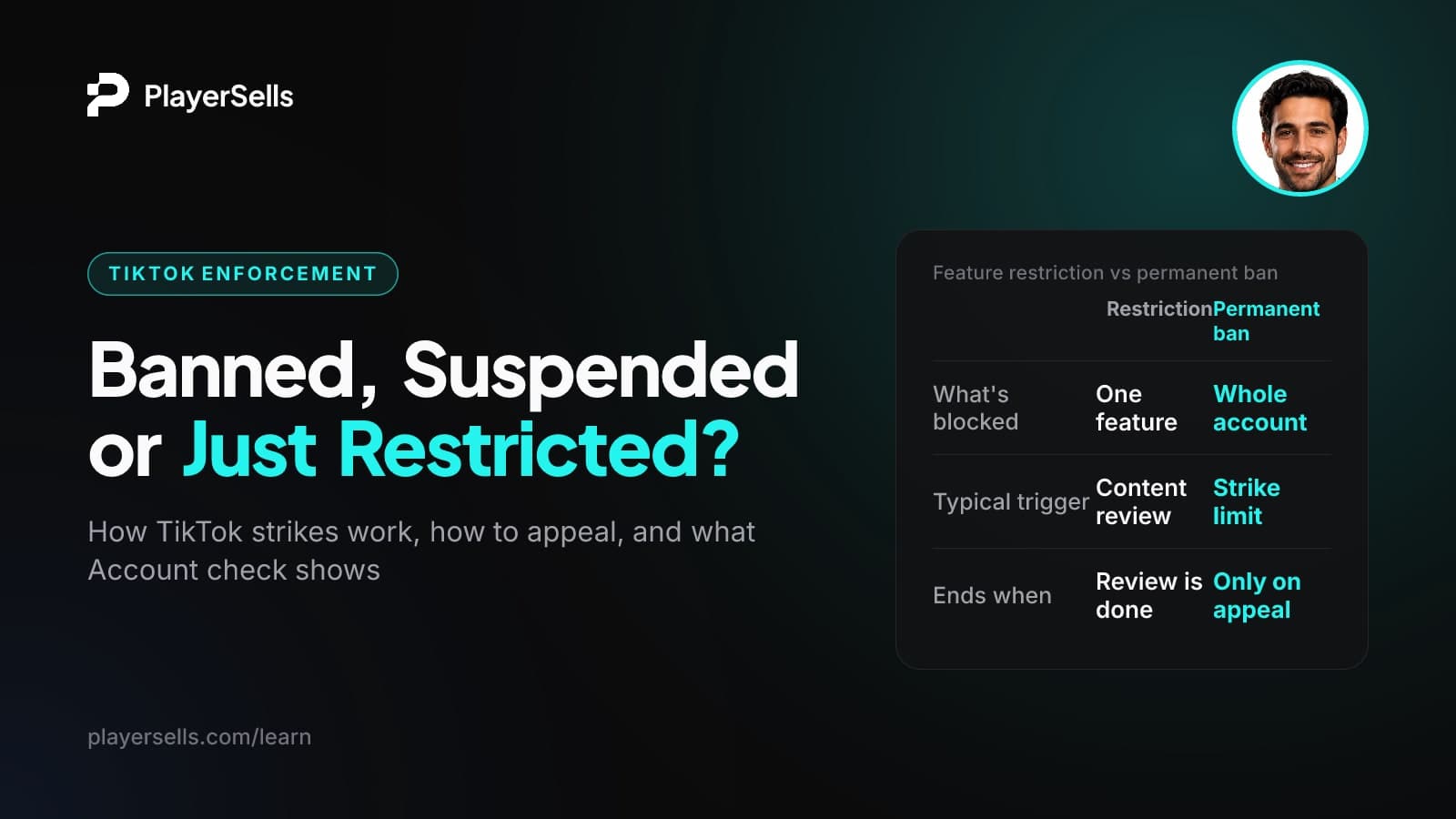
Most "banned" messages are not permanent bans. TikTok runs a ladder of enforcement, and each step looks different in the app and needs a different response. The table below maps each level to what you will see.
| Enforcement level | What you see | What still works | How to respond |
|---|---|---|---|
| Warning | A notice in Inbox > System notifications > Account updates | Everything | Read the policy cited. Appeal if it was a mistake. |
| Strike | A violation notice tied to a policy area or a feature | The account, unless a threshold is reached | Appeal if wrong. Avoid repeating the same behavior. |
| Feature restriction | One feature, such as LIVE or direct messages, is unavailable while content is reviewed | The rest of the account | Wait for the review and appeal from the notice if it is wrong. |
| Account restriction | Account check flags login, posting, commenting, profile-editing or messaging restrictions | Whatever is not flagged | Open the flagged item in Account check to see the reason and appeal. |
| Permanent ban | A ban notice on the account | Normal use stops | Appeal from the ban notice. Do not open a new account to get around it. |
People often say "suspended" when they mean a temporary restriction. Before 2023, TikTok leaned on temporary bans on posting or commenting, as TechCrunch reported when the strike system launched. Today, strikes are the main route to a permanent ban, and feature blocks are used to stop a behavior while something is under review.
How do TikTok strikes work?
TikTok's current rule is simple to state: the first violation usually earns a warning, and every violation after that adds a strike. According to TikTok's Safety Center page on content violations and bans, a severe first violation skips the warning, gets a strike straight away and can lead to a ban.
Strikes are counted by policy and by feature
Strikes are not one global counter. TikTok tallies them by Community Guidelines policy area (for example, safety and civility) or by feature (for example, comments or direct messages). A run of bad comments builds toward a comments threshold, not necessarily toward a ban for something unrelated.
TikTok explained the reasoning when it introduced the system. Its analysis found that almost 90% of repeat violators keep breaking the rules using the same feature, and over 75% repeatedly break the same policy category. Counting per feature and per policy targets exactly that pattern.
How many strikes before a ban?
There is no public number. In its February 2023 newsroom post on the updated enforcement system, TikTok said thresholds depend on potential harm, so promoting hateful ideologies can carry a stricter threshold than low-harm spam. Any article that tells you "three strikes and you're out" is guessing.
Two more rules from that post matter. Accounts with a high number of cumulative strikes across policies and features are also permanently banned. And TikTok has said strikes expire from an account's record after 90 days. The Safety Center also says TikTok will warn users who are getting close to a ban.
Moderation is not purely automated
TikTok uses a mix of technology and human moderators. Some content that would otherwise break the rules, such as documentary, educational, medical, satirical or counterspeech content, may stay up but be made ineligible for the For You feed or carry a warning screen. In those cases the post stays up, but its reach or presentation is limited.
What gets a TikTok account permanently banned?
As of October 2026, TikTok's Safety Center lists these grounds for a permanent ban (the cumulative-strikes rule comes from TikTok's 2023 newsroom post):
- Terms of Service problems, including not meeting the minimum age.
- Impersonation: deceptively pretending to be a person or entity.
- A single severe violation, such as youth exploitation or child sexual abuse material, promoting or threatening violence, or showing real-world violence or torture.
- Reaching the strike threshold within a policy or a feature, or piling up many strikes across policies.
- Ban evasion: creating or using another account to deliberately get around restrictions or a ban on a different account.
These rules apply to everyone. TikTok says government, politician and political party accounts and news entities are moderated the same way, and will be permanently banned for severe violations.
TikTok lists creating or using another account to get around a restriction or ban as its own ground for a permanent ban. Opening or buying a replacement account to keep doing what got you banned puts that new account at risk too.
How do I check my TikTok account status?
You have two main places to look: your violation notices in the Inbox and the Account check scan in TikTok Studio. Menu paths can vary by app version and region, so if a step looks different on your phone, look for the nearest equivalent label.
Where violation notices appear
Go to Inbox > System notifications > Account updates. You may need to scroll sideways through the notification categories to find Account updates. The notice is where you start an appeal. TikTok says a record of violations is also available in Account check.
When the strike system launched, TikTok described an "account status" section showing strikes from the previous 90 days, as Engadget reported. Users also describe reaching a status screen through Settings and privacy, but the exact path changes between versions.
How to run Account check
Per TikTok's Creator Academy guide to Account check:
- Step 1: Open your Profile and tap the Menu icon (three lines).
- Step 2: Go to TikTok Studio, then More tools, then Account check.
- Step 3: Wait while each item shows "scanning." The tool checks login, posts, comments, profile and direct messages.
- Step 4: Read the results. A green check mark means no issue. A red exclamation point means a problem was found. A fully clean result lists the account as "in good standing."
- Step 5: Tap any flagged item to see the reason and, if you disagree, appeal from there.
What Account check does not show
Account check is useful, but it has three blind spots that matter, especially to buyers:
- It only scans the last 30 posts. Older posts with violations or feed restrictions are outside the scan.
- It leaves out features blocked for non-ban reasons. If a feature is unavailable because of something like an age restriction, it simply does not appear in the list. A missing row is not the same as a green check.
- Strikes age out. Because TikTok has said strikes expire after 90 days, an account that was close to a threshold four months ago can look spotless today.
How do you appeal a TikTok ban or violation?
You appeal from the notice itself, either in Account updates or by opening the flagged item in Account check. Here is a sensible sequence:
- Step 1: Open the violation or ban notice and note the exact policy and the post, comment, LIVE or message it refers to.
- Step 2: Re-read that content honestly against the policy. If it fits one of TikTok's exceptions (educational, documentary, satire, counterspeech), that is your argument.
- Step 3: Submit the appeal from the notice with a short, factual explanation of why the decision is wrong. One clear appeal per action beats several angry ones.
- Step 4: If only one feature is restricted, keep using the rest of the account normally and do not repeat the flagged behavior while the review runs.
- Step 5: Check Account updates and Account check again for the outcome.
TikTok's public pages reviewed for this article do not give a fixed appeal timeline, so be wary of anyone quoting one. If you are in the EU, the Digital Services Act may give you additional routes to challenge a decision. Check what your notice offers in your region.
Two things not to do. Do not pay an "unban" service: nobody outside TikTok controls the outcome, and handing over your login creates a fresh security problem. And do not open a new account to keep posting, since that is the ban-evasion ground listed above.
Are TikTok Shop and Ads suspensions the same thing?
No. TikTok Shop and TikTok Ads run their own health and suspension systems, separate from Community Guidelines strikes on a regular account. Mixing them up leads to the wrong appeal and the wrong conclusions.
TikTok Shop (US). Sellers can link an official TikTok account plus up to four creator accounts. The Seller Center Account Health page shows those accounts' status, violation points and violation records for the past 90 days, with an Appeal button for each enforcement action. That 90-day window belongs to Shop's points system and is separate from the strike expiry above. US sellers may also see precautionary temporary restrictions during security, risk or compliance checks. These are not always tied to a violation and, per TikTok Shop's US guidance on temporary restrictions, are usually lifted within 30 days once reviews finish and the required information is verified.
TikTok Ads. Repeated ad policy violations can put an ad account at risk of suspension. Alerts with the violation details and the possible suspension date appear in the TikTok Business Help Center.
Checking a TikTok account's status before you buy
If you are buying a TikTok account, ask the seller to show these screens live (a screen share or recorded video made on the spot), not as old screenshots. Before going further, also read TikTok's current Terms of Service on account ownership and transfer; our guide to terms of service versus actual law explains the difference.
| Check | Where | Good sign | Red flag |
|---|---|---|---|
| Account check | TikTok Studio > More tools > Account check | Every item green, "in good standing" | Any red item, or the seller refuses to run it live |
| Violation notices | Inbox > System notifications > Account updates | No recent notices, older ones explained | Repeated notices in the same policy or feature |
| Feature availability | Try LIVE, comments and DMs | All work normally | Features missing from the Account check list with no clear reason |
| Recent posts | Profile and Account check results | No recent posts removed or marked not eligible for the feed | Several posts removed or not eligible for the feed |
| Shop Account Health (if linked, US) | Seller Center > Account Health | No active enforcement actions | Open violation points or restrictions |
| Ads account (if included) | TikTok Business Help Center | No suspension alerts | An alert with a pending suspension date |
Remember the blind spots. A clean scan covers 30 posts and the strikes still on record, so ask directly about anything older than 90 days. TikTok's own data says repeat violators overwhelmingly repeat the same feature and policy, so a past pattern of comment or LIVE violations is worth asking about even if it has expired. Pair the status check with performance checks such as the TikTok engagement calculator, and see what drives TikTok account prices to judge whether the asking price reflects any risk.
If you were banned yourself, do not buy an account to replace the banned one and carry on with the same activity. That falls under the ban-evasion rule and can take the new account down too.
Buying or selling a TikTok account safely on PlayerSells
Account status is one risk. Getting paid, or getting what you paid for, is the other. On PlayerSells, every listing is reviewed by a person before it goes live, and payment runs through escrow: the buyer pays PlayerSells, the money is held, and the seller is paid only after the buyer confirms the account was delivered as described.
Every deal follows the same sequence: offer sent, accepted, payment pending, paid, delivered, buyer confirmed, completed. That "delivered" stage is when to run the Account check and Inbox checks above. If something does not match the listing, either side can open a dispute before completion, a human moderator reviews it, and the money stays held while it is open. You can browse TikTok accounts on PlayerSells and read our safety guidelines before you start. Sellers should read how to sell a TikTok account and its real risks, and buyers should know how recovery scams work.
Frequently asked questions
How long does a TikTok ban last?
A permanent ban lasts indefinitely unless it is overturned on appeal. Feature restrictions on things like LIVE or DMs are tied to TikTok's review of the content, and TikTok's public pages do not list fixed durations for them. US TikTok Shop precautionary restrictions are a separate case and are usually lifted within 30 days.
What is the difference between a suspended and a banned TikTok account?
"Suspended" usually describes a temporary restriction, while "banned" means a permanent ban. A restricted account can still use some features, and Account check shows which ones are blocked. A permanently banned account has hit a strike threshold, committed a severe violation, or fallen under another permanent-ban ground such as age or impersonation.
Can a permanently banned TikTok account be recovered?
The legitimate route is TikTok's own appeal, started from the ban notice. If the appeal succeeds, the account is restored. Services that promise to "unban" accounts for a fee cannot control TikTok's decision and often just collect your login details.
How many strikes before TikTok bans your account?
TikTok does not publish a number. Thresholds differ by policy and feature and depend on potential harm, so a high-harm policy can have a stricter limit than spam. One severe violation can be enough, and many strikes across different policies can also lead to a ban.
Do TikTok violations go away after 90 days?
TikTok has said strikes expire from an account's record after 90 days, according to its February 2023 newsroom post. TikTok Shop uses a separate violation-points system that also shows the past 90 days, so do not mix the two up. An expired strike no longer counts toward a ban, but the behavior behind it may still matter to a buyer.
How do I check my TikTok account status?
Check Inbox > System notifications > Account updates for violation notices, then run Account check from Profile > Menu > TikTok Studio > More tools > Account check. A clean result lists the account as "in good standing." Menu paths may vary by app version and region.
How long does a TikTok appeal take?
It varies, and TikTok does not state a fixed timeline on the pages reviewed for this guide. Check Account updates and Account check for the result. Submitting one clear, focused appeal per action is better than repeating the same request.
Why was my TikTok account banned for no reason?
There is almost always a stated reason in the notice, even if it feels wrong. Check Inbox > System notifications > Account updates and Account check for the policy cited. Moderation mixes automated systems with human review, so mistakes happen, and the appeal exists to correct them. If you bought the account, the history before your purchase may also be involved, as explained in what happens when a bought account gets suspended.
Can I make a new TikTok account after being banned?
Creating or using another account to deliberately get around a ban is listed by TikTok as grounds for a permanent ban, so a replacement account is at real risk. The legitimate route is to appeal the original decision. If the ban stands, accept that the account and the behavior behind it are done.
Bottom line
Before you panic, identify the level: a warning, a strike, a single blocked feature, an account restriction or a true permanent ban. Read the notice, run Account check, and appeal once, clearly, from the notice if the decision is wrong. Never try to get around a ban with another account.
If you are buying, treat a clean Account check as a starting point, not proof. Ask about history beyond 90 days and the last 30 posts, verify features live, and use escrow so you can raise a dispute before the deal completes. Start with our safety guidelines before you make an offer.
Free tools for this topic

Published by the PlayerSells editorial team. Data comes from PlayerSells marketplace records and our own crawlers. About PlayerSells · Editorial policy
Related Articles
Continue learning with these related guides.
What Is TOTP? How Authenticator Codes Work and Beat SMS
What is TOTP? A plain guide to how authenticator codes are made, why they beat SMS against SIM swaps, and how to move them to a new phone safely.
YouTube Copyright Strike vs Guidelines Strike: Buyer's Guide
A YouTube copyright strike and a Community Guidelines strike follow different rules. See how long each lasts, when channels get terminated and how to check.
Chargeback Scams: How Digital Goods Sellers Lose Money
A chargeback scam is when a buyer receives an account or item, then reverses the payment. See why digital sellers lose disputes and which setups protect you.