
How to Change Your Instagram Username: Limits and 14-Day Rule
Change your Instagram username in the app or Accounts Center, then learn the 14-day revert window, change limits and what others see in About this account.
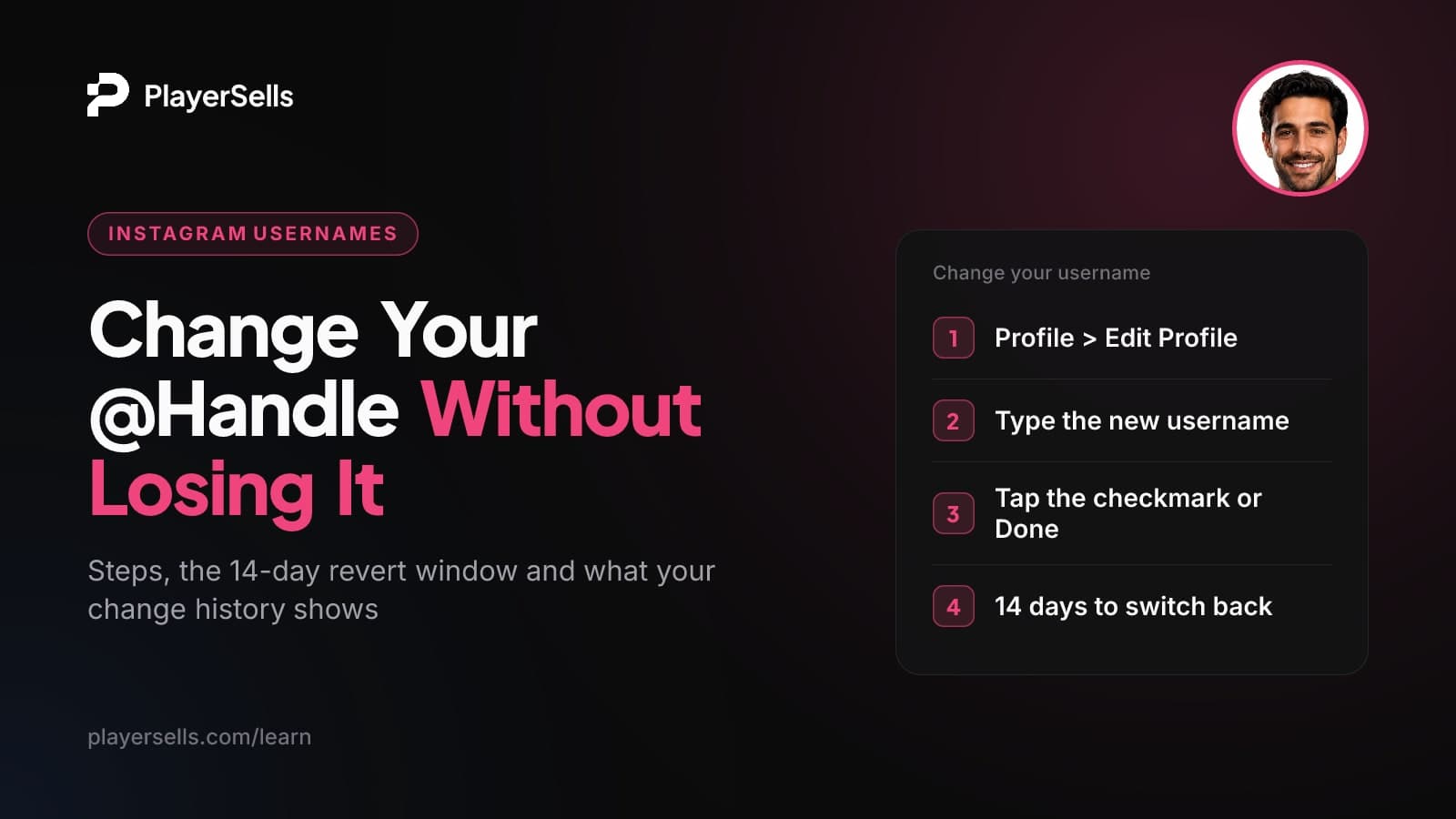
To change your Instagram username, open your profile in the app, tap Edit Profile, type a new handle in the Username field and tap the checkmark (Done on iPhone). Instagram shows a notice that you have 14 days to switch back, as long as nobody claims the old handle first. On desktop, the edit may send you to Accounts Center. Other people can't see your past usernames, but they may see how many times you've changed it.
This guide is for creators rebranding a page, businesses tidying up their handle, and anyone who has bought or sold an Instagram account and needs to know what a handle change leaves behind. It covers the exact steps on mobile and desktop, the username rules, the disputed change limits, the 14-day revert window, what "About this account" shows, and what to do when the handle you want belongs to an inactive account.
Key takeaways
- You change your Instagram username under Profile > Edit Profile > Username, and on desktop the edit may open in Accounts Center.
- Instagram shows a notice that you have 14 days to change back to your old username, but only if no one else has claimed it in the meantime.
- Instagram usernames can be up to 30 characters and can contain only letters, numbers, periods and underscores.
- Sources disagree on the change limit, so plan for the commonly reported limit of twice every 14 days and wait out the 14 days if the app blocks you.
- Instagram's "About this account" panel may show other logged-in users how many times an account has changed its username, but not the old usernames themselves.
- Instagram offers no process for claiming a username held by an inactive account; its official advice is to choose a variation of the name.
How do you change your Instagram username?
Go to your profile, open Edit Profile, replace the text in the Username field and save. The menu labels below are current as of October 2026 and can differ slightly by app version, region, and whether you use a personal or business account.
On iPhone or Android
- Step 1: Open the Instagram app and tap your profile icon.
- Step 2: Tap Edit Profile.
- Step 3: Tap the Username field, delete the current handle and type the new one.
- Step 4: Tap the checkmark on Android, or Done on iPhone.
- Step 5: If the app says "Username not available," the handle is either taken or breaks the naming rules. Try a variation and save again.
Read the fine print before you leave the screen. According to SlashGear's walkthrough, the Edit Profile screen shows a notice that you have 14 days to switch back to your previous username.
On desktop (instagram.com)
The desktop route works too, but clicking Edit Profile at instagram.com may send you to Accounts Center. Many older guides skip this, which is why people get stuck looking for a Username field that isn't there.
- Step 1: Log in at instagram.com and open your profile.
- Step 2: Click Edit Profile. If you see a prompt like "See More in Accounts Center," follow it.
- Step 3: In Accounts Center, select the Instagram profile you want to edit.
- Step 4: Edit the username and click Done.
What are Instagram's username rules?
A username must be unique, up to 30 characters long, and made only of letters, numbers, periods and underscores. Anything else, including spaces and emojis, gets rejected.
| Rule | What Instagram allows (as of October 2026) |
|---|---|
| Length | Up to 30 characters |
| Allowed characters | Letters, numbers, periods (.) and underscores (_) |
| Not allowed | Spaces, emojis, and symbols such as #, @ or & |
| Uppercase vs lowercase | Not case-sensitive: @YourName and @yourname count as the same handle |
| Uniqueness | Must be unique; handles are first-come, first-served |
| Language | No profanity or restricted language |
Sources phrase the length limit slightly differently ("up to 30" versus "under 30"). If a handle of exactly 30 characters is rejected, drop a character and try again.
Don't confuse the username with the display name. The username is your @handle, and it forms your profile URL (instagram.com/username). The display name is the name shown on your profile. Sources disagree on whether the reported change limits apply to the username, the display name or both, which is why the next section matters.
How many times can you change your Instagram username?
Instagram limits how often you can change your name. The limit is commonly reported as twice every 14 days. Published sources disagree, though, on whether that limit covers the username, the display name, or both. If the app blocks a change, the practical fix is to wait out the 14 days.
Here is what published guides say, so you can see where the confusion comes from:
| Source | Date | What it reports |
|---|---|---|
| Linktree | Around February 2026 | Username can be changed as often as you like, but only twice within 14 days |
| Croma Unboxed | Around May 2024 | Display name can change once in 14 days, separate from the username limit |
| SlashGear | Around February 2023 | The "twice in 14 days" limit applies to the display name; no limit on username changes |
The newer sources lean toward "twice in 14 days" for the username. Instagram may also have changed the rule over time, which would explain the older reports. Since nobody can quote an official number, the safe plan is to treat every change as one of only two you get in a two-week stretch.
There's a better reason to limit yourself than the cap itself. Every change can raise the public Former username count on your account, which brands, collaborators and account buyers read as a signal. More on that below.
Can you change back to your old Instagram username?
Yes, within 14 days, provided no one else has taken your former handle in the meantime. To switch back, repeat the same steps and type your old username into the Username field.
The window exists to protect you. When Instagram tested the feature in March 2019, it told Fortune that it holds your old username in reserve for 14 days after a change, because a changed or lost handle could otherwise be claimed quickly by someone else. As Tom's Guide notes, reverting only works if the handle is still free. Treat that as a reason to decide early in the window, not on day 13.
If you might want your old handle back, decide inside the 14 days. After that, any Instagram user can claim it, and Instagram's help pages describe no way to request it back.
What happens to the old handle?
Three things change when you switch usernames, and most guides only mention the first.
- Your old profile URL stops working. instagram.com/oldname no longer leads to you, so links on your website, other social profiles and link-in-bio pages need updating.
- Old @mentions point to the old handle. Captions and comments that typed out your old @name won't update to the new one, and if someone claims the old handle later, those mentions point to them.
- Someone else can take it. Once the 14 days pass, whoever claims the old handle inherits every printed flyer, business card and old link that still uses it. That includes people who might want to impersonate you.
Who can see your former Instagram usernames?
Other people can't see your old usernames, but they may see how many times you've changed it. According to Instagram's Help Center page on About this account, the panel shows logged-in users a "Former username count" (the number of changes, not the names) and the "Date joined" for the account. Date joined appears on both Instagram and Threads.
How to check another account's username changes
- Step 1: Open the account's profile while logged in.
- Step 2: Tap the three-dot menu.
- Step 3: Choose About This Account.
- Step 4: Look for Former Usernames, which shows the number of changes.
The panel isn't available on every account, and the Former Usernames line may not appear if the account hasn't changed its handle recently. So read it as "may show," not "always shows." Instagram used to list old usernames with dates but now shows only the count. If an older article describes a visible list of names, it's out of date. Third-party "former username checker" sites are not official and their results aren't verified, so don't rely on them.
For buyers and brand partners, this panel is a quick trust check. Compare the Date joined and the Former username count against what the seller or creator told you. A young account with several handle changes, or an "aged" account whose join date doesn't match the claim, deserves questions before money moves. Buying on another platform? See our guides on reading an X account's real history and Telegram username history.
How to see your own username history
You can see your own past usernames, with dates, even though others can't. Go to Profile > menu > Your activity > Account history. In the app you can filter by update type. On the web you can only filter by date.
This is the place to confirm the exact spelling of an old handle before you try to reclaim it inside the 14-day window. One wrong period or underscore and you've claimed a different name.
How do you get a username an inactive account is using?
In most cases you can't. Instagram usernames are first-come, first-served, and Instagram's official help page advises choosing an available version of the name by adding periods, numbers, underscores or abbreviations. It describes no way to request or claim a handle from an inactive account.
That leaves a few realistic options:
- Use a variation. Something like name.official, the_name or an abbreviation is Instagram's own recommendation, and it works today.
- Message the owner. You can politely ask whether they'd swap or release it. There's no guarantee they'll reply, let alone agree.
- Trademark owners only: if you hold a genuine registered trademark for the name, filing a trademark report with Instagram is a separate path. It's a legal claim, not a way to grab a name you simply like.
Be skeptical of "request your inactive username" email templates that circulate online. Instagram's help page doesn't support that process, so they mostly cost you time.
What should you check before changing your username?
Settle the new handle and update everything that points to the old one within the same session, then decide on any reversal within 14 days. Use this checklist:
- Test the new handle against the rules: up to 30 characters, letters, numbers, periods and underscores only.
- Check it on your other platforms so your handle matches everywhere people look for you.
- Write down your current handle exactly, or confirm it in Account history, in case you want it back.
- Update every link: website, link-in-bio page, email signature, ads, shop links and any QR codes.
- Tell brands and collaborators so future tags use the new handle.
- Refresh your bio at the same time. A rename is a good moment to tighten the bio, and the free Instagram bio optimizer can help.
- Count the cost to your history: each change can raise the visible Former username count.
- Set a reminder for day 10 to confirm you're happy before the 14-day hold ends.
Renaming a bought or sold account on PlayerSells
Handle changes matter most when an account changes hands. Platform terms can restrict transferring accounts, and our guide to social media account transfer rules quotes each platform's clauses so you know the risks before you list or buy.
If you're selling, avoid renaming the account repeatedly before you list it. Buyers can check the Former username count, and every listing on PlayerSells is reviewed by a person before it goes live, so describe the account's history honestly. If you're buying from Instagram accounts for sale or planning to rename an account from the Instagram theme pages category, check About this account and verify everything before you confirm delivery.
That order protects you. With PlayerSells escrow, your payment is held and the seller is paid only after you confirm the account arrived as described. Either side can open a dispute before completion, a human moderator reviews it, and the money stays held while it's open. How PlayerSells works walks through each stage. Make sure you control the login details before you confirm (see changing the email and phone on a bought account), and rename only after the deal is completed.
Frequently asked questions
Why does Instagram say "Username not available"?
The handle is either already taken or breaks the naming rules. Check for spaces, emojis, symbols like # or @, a length over 30 characters, or restricted words. Remember that usernames aren't case-sensitive, so changing capital letters won't make a taken handle available.
What's the difference between an Instagram name and a username?
The username is your unique @handle and appears in your profile URL. The name, or display name, is the text shown on your profile. They're changed in the same Edit Profile screen, and sources disagree on which change limit applies to which field.
Are Instagram usernames case-sensitive?
No. Instagram treats @YourName and @yourname as the same handle. You can't register a second account that differs only by capital letters.
Do links to my old Instagram username still work?
No. Your old profile URL (instagram.com/oldname) stops pointing to you as soon as you change your handle. If someone claims the old handle after the 14-day window, those links lead to their profile instead.
Can third-party tools reveal someone's old Instagram usernames?
Not reliably. Instagram now shows only the number of username changes, not the names, and third-party "former username checker" sites are unofficial and unverified. Treat their results with caution and use About this account instead.
Can I claim a username if I own the trademark?
Possibly, through a trademark report, which is separate from the normal username process. This applies only to genuine registered trademark owners. It isn't a general way to get a handle you want from an inactive account.
Bottom line
Change your username only when you're sure, update every link in the same sitting, and decide within 14 days whether to switch back. Plan around a limit of two changes every 14 days, and keep the Former username count low, because buyers and brand partners can see it.
If you're renaming an account you just bought, verify it through escrow first and secure the login before you touch the handle. Browse reviewed Instagram listings when you're ready.
Free tools for this topic

Published by the PlayerSells editorial team. Data comes from PlayerSells marketplace records and our own crawlers. About PlayerSells · Editorial policy
Related Articles
Continue learning with these related guides.
Kick Creator Incentive Program: Requirements, Pay, Payouts
Kick Creator Incentive Program requirements as of 2026: 75 CCV, 30 hours, 25 subs, plus verification, the 95/5 split and how Stripe payouts arrive.
How to Sell a Valorant Account: Riot Rules, Value, Handover
Selling a Valorant account breaks Riot's ToS and risks a ban. Learn what drives value, the proof buyers want, and a handover order that limits recovery risk.
YouTube Brand Account: Owners, Managers and Primary Owner
A YouTube Brand Account lets several people run one channel. Learn the primary owner, owner and manager roles, the 7-day transfer rule and pre-buy checks.