
How to Transfer Discord Server Ownership Safely
Transfer Discord server ownership on desktop or mobile: the 2FA prompt, what to check after, Server Subscription payouts, and whether selling is allowed.
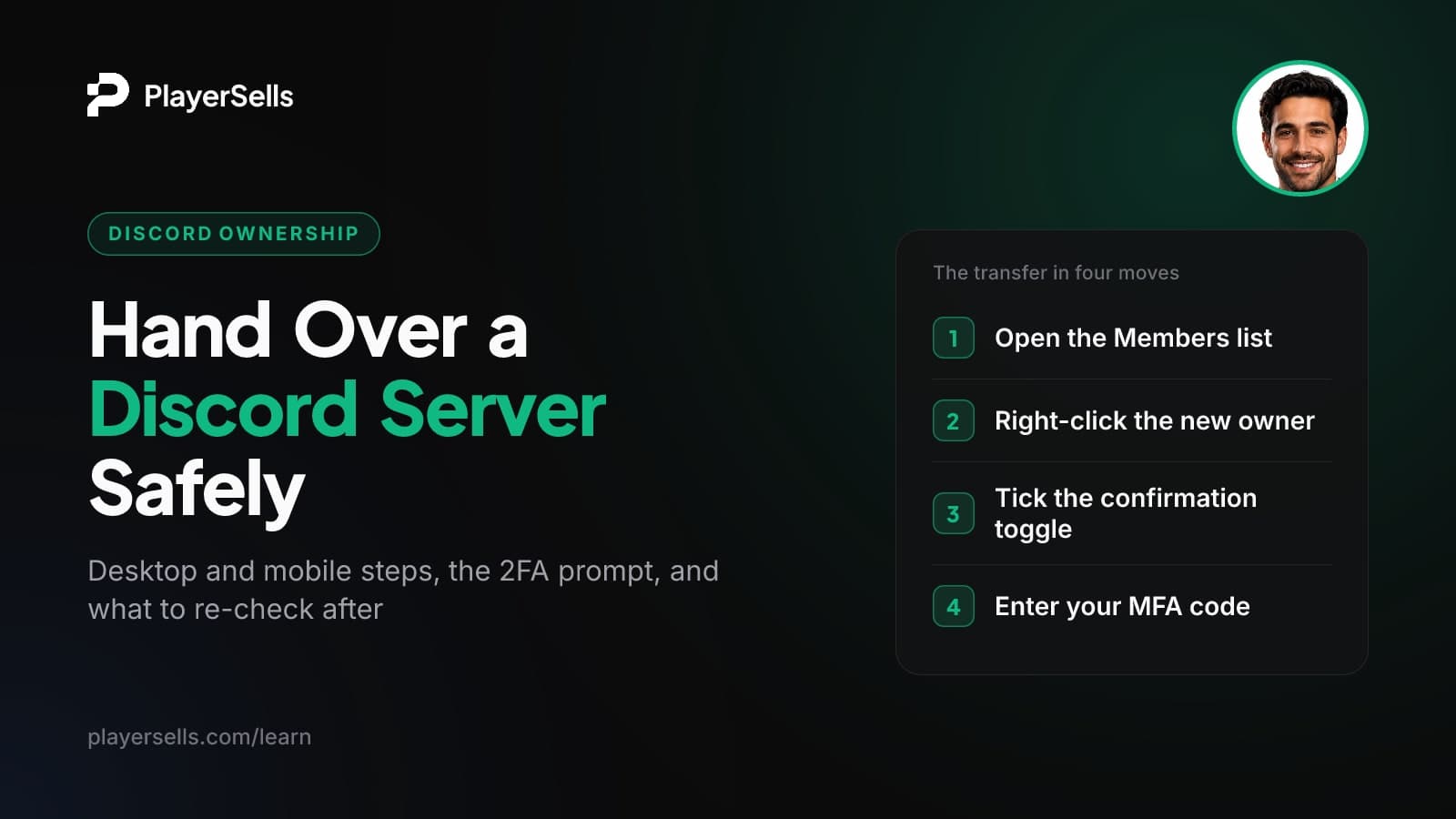
Only the current owner can transfer a Discord server. On desktop, open the server's Members tab, right-click the new owner and choose Transfer Ownership. Then tick the confirmation toggle and enter your MFA code if your account has MFA turned on. On mobile, go to Server Settings > Members, tap the member, then Transfer Ownership > Transfer.
This guide is for server owners handing a community to a co-founder, a successor moderator or a new team, and for members trying to take over a server whose owner has disappeared. It covers the exact steps on each device, how the verification prompt works, what to audit before and after, how monetized servers change hands, and what Discord's rules say about selling a server.
Key takeaways
- Only the server owner can transfer ownership of a Discord server, and admin permissions are not enough.
- Discord asks for your MFA code during the transfer only if your account has MFA enabled, so 2FA is not a hard requirement, though secondary sources say accounts without it get an email code instead.
- After a transfer, the previous owner stays in the server as a member, and only the new owner can transfer it back.
- On servers with Server Subscriptions, all payouts go to the new owner, who must set up a Discord Team and payout account before accepting.
- If an owner is inactive, the person who wants to become owner can file a Server Ownership Transfer request with Discord Support, but approval is not guaranteed.
- As of October 2026, Discord's Community Guidelines prohibit buying or selling servers, server permissions and custom invite links.
What do you need before transferring a Discord server?
You need to be the owner, the recipient needs to be a member of the server, and both of you should have your security settings sorted before you press anything. A transfer takes seconds, so the preparation is where mistakes get prevented.
The most common misunderstanding is about admins. According to Computer Hope, having the Administrator permission does not let you transfer a server. Ownership is a separate status that belongs to one account, and only that account sees the Transfer Ownership option.
| Requirement | Why it matters | How to check |
|---|---|---|
| You are the current owner | Admin rights cannot transfer a server | Look for the owner crown next to your name in the member list |
| Recipient is in the server | You select them from the Members list | Search their username in Members |
| Recipient has 2FA turned on (recommended) | Servers that require 2FA for moderation may leave a non-2FA owner unable to moderate | Ask them to confirm it in their account settings first |
| You can receive your verification code | Discord may ask for an MFA code or, per secondary sources, an email code | Have your authenticator app or email inbox open |
| Payout setup done (monetized servers only) | Server Subscription payouts move to the new owner | New owner sets up a Discord Team and payout account |
| Role and bot audit done | The transfer does not review permissions for you | List every admin role and every bot with elevated permissions |
Why the Transfer Ownership option is missing or greyed out
It is usually one of three things. You are not actually the owner (common when you were made Administrator and assumed that was the same thing), the person you want is not a member of the server, or you are looking in the wrong place. On mobile, Discord's official steps put the option under Server Settings > Members, so start there. If none of these apply, update the app or try the browser version, since several guides still show menu paths from 2021-2023 that no longer match.
How do you transfer Discord server ownership, step by step?
The flow is short on both desktop and mobile: pick the member, choose Transfer Ownership, confirm, and enter a code if asked. These steps follow Discord's official help article on transferring server ownership, as of October 2026.
On desktop or in a browser
- Step 1: Open Discord and select the server you own.
- Step 2: Open the Members tab so you can see the full member list.
- Step 3: Right-click the member who will become the new owner and press Transfer Ownership.
- Step 4: In the confirmation window, select the toggle that acknowledges you are giving up ownership, then select Transfer Ownership.
- Step 5: If your account has MFA enabled, enter the code from your authenticator app. The transfer completes once the code is accepted.
On mobile (iOS and Android)
- Step 1: Open the Discord app and select the server.
- Step 2: Press Server Settings, then Members.
- Step 3: Tap the member who will become the new owner and select Transfer Ownership.
- Step 4: Confirm the acknowledgement and press Transfer.
- Step 5: Enter your MFA code if Discord asks for it.
Take a breath before Step 4. Once you confirm, you are an ordinary member of a server you may have built for years, and nothing in Discord's documentation describes an undo button.
Rules in other guides that Discord does not mention
Several ranking guides repeat requirements that do not appear anywhere in Discord's documentation: a 7-day membership minimum for the recipient, a "Review and Accept" DM the recipient must approve, a limit of one owned server per account, a minimum client version, "four owners per server", and ownerless servers being auto-deleted. Discord's official flow has the current owner confirm with a toggle and, if MFA is on, a code. If a guide tells you to wait for something Discord never mentions, trust the official article.
Do you need 2FA to transfer Discord server ownership?
No, not strictly. Discord's help article says the MFA code is requested if you have MFA enabled, which means accounts without it can still transfer. But there are three different "2FA" situations people mix up, and each one affects the handover differently.
| Situation | What happens | Source |
|---|---|---|
| Your account has MFA (authenticator app) on | Discord asks for your MFA code before the transfer completes | Discord Support |
| Your account has no app-based 2FA | A verification code is sent to your registered email on desktop | Android Police (secondary, 2023) |
| The server requires 2FA for moderation | A new owner without 2FA may be unable to use moderation powers | User reports; treat as advice |
The third row is the one that causes real problems. A user-reported case on Discord's community forum described ownership going to a member without 2FA in a server that required it, leaving them unable to moderate. The fix is simple: make sure the recipient turns on 2FA before you transfer, and confirm it with them, not just assume.
What changes hands, and what should you re-check afterwards?
Ownership and, on monetized servers, payouts move to the new owner. The old owner stays as a member. Beyond that, Discord's transfer article says very little, so treat bots, boosts, roles and the custom invite link as things to verify on the live server rather than assume.
| Item | What is documented | What to check after the transfer |
|---|---|---|
| Ownership | Moves to the new owner (Discord Support) | The crown appears next to the new owner's name |
| Previous owner | Stays a member (Discord Support) | Which roles they still hold; remove admin roles if agreed |
| Other admins | Not addressed in the transfer article | Every role with Administrator or Manage Server permissions |
| Bots | Not addressed in the transfer article | Each bot's permissions, and who controls the bot's app if it was custom-built |
| Server Boosts | Boosts are not refundable and can be moved to another server after seven days (Digital Citizen, secondary) | Boost count and level a week or two later, especially if the old owner was a big booster |
| Custom invite link | Unlocks at Boost Level 3, which takes 14 boosts (Replug, secondary) | That the link still works and the server still has Level 3 |
| Server Subscription payouts | All payouts go to the new owner (Discord Creator Support) | That the new owner's Team and payout account are active |
Boosts deserve a closer look. Members buy them individually and, per secondary sources, can move them to another server after seven days. If the previous owner or their friends supplied most of them, watch whether the server's level holds after the handover. The custom invite link (previously called the vanity URL) sits under Server Settings > Boost Perks > Custom Invite Link and is a Level 3 perk, so if the boost count falls, check right away whether the server still has its short link.
Bots are the other blind spot, and Discord's transfer article does not cover them. A custom bot that the old owner built or hosts still depends on them to keep it running. Ask, in writing, who controls each bot before the transfer, not after.
How do you transfer a server with Server Subscriptions?
The new owner has to set up a Discord Team and a payout account first, then accept the Monetization Terms after the old owner starts the transfer. Discord defines the owner as the person who receives all Server Subscription payouts, so after the transfer every payout goes to the new owner.
The sequence below follows Discord Creator Support's guide to transferring a server with Server Subscriptions. That article was last updated some time ago, so check the current settings screens as you go. Server Subscriptions availability also varies by region.
- Step 1: The new owner creates a Discord Team and sets up a payout account. Payouts run through Stripe, and Discord's payout onboarding guide says creators must finish Stripe onboarding before money can reach a bank account.
- Step 2: The current owner starts the ownership transfer using the normal desktop or mobile steps above.
- Step 3: The new owner opens the server's Server Subscriptions settings, accepts the Monetization Terms and the Server Subscription Policy, and selects their Team.
- Step 4: Both sides confirm that subscription tiers, roles and perks still look correct.
The part people forget is the obligation. Per Discord Creator Support, once the new Team and payout information are added, the new owner is responsible for delivering all benefits and perks tied to existing subscriptions. If subscribers were promised weekly calls or exclusive channels, those promises now belong to the new owner.
What if the owner is inactive or gone?
You can ask Discord Support for a Server Ownership Transfer, but Discord may review the request and approval is not guaranteed. Community members report denials in some cases, for example when the previous owner was banned.
According to Discord's article on requesting a transfer of server ownership, the person who wants to become owner must file the ticket themselves, unless the server is Partnered or Verified. Discord will not act on requests made on behalf of another user, so a friend cannot file it for you.
Your request needs:
- The server name and server ID
- The inactive owner's username and user ID
- Your username and user ID as the proposed new owner
- Whether the server is monetized, Partnered or Verified
To copy IDs, turn on Developer Mode in your Discord settings, then right-click the server or a user and copy the ID. Get every ID right on the first try. A clean, complete ticket is your best chance of a review.
Can you sell a Discord server?
No. Discord's rules do not allow it. As of October 2026, Discord's Community Guidelines (last updated August 29, 2025) tell users not to sell or purchase Discord assets, and they list accounts, usernames, servers, server permissions and custom server invite links by name.
Discord's Community Guideline #16 bans buying or selling servers, server permissions and custom invite links, with no stated exception. A paid handover breaks Discord's rules and can lead to enforcement against the accounts involved or the server itself.
Discord's Terms of Service add that users must not license, sell, lend or transfer their account, username, vanity URL or other unique identifier without Discord's prior written approval. Guideline #15 separately bans artificially inflating server membership and selling artificial engagement, which matters if anyone offers you a "server with members".
Many marketplace and forum pages rank for "sell discord server" without mentioning any of this. A free handover to a trusted co-owner or successor is what Discord's transfer button exists for. Money changing hands for the server is what the Guidelines prohibit, and an old 2018 Discord post about selling roles predates these rules and does not cover selling servers.
Where PlayerSells fits, and where it does not
Escrow protects the payment between two people. It cannot protect anyone from a platform enforcing its own rules. Because Discord's Guidelines prohibit selling servers, we would not advise building a deal around one, with or without escrow.
If you are deciding where to build or acquire an audience, it is worth comparing platforms first. Our Telegram vs Discord community comparison covers the differences, and our guide to transfer rules on every platform quotes each platform's actual clause, so you know the risk before you commit.
PlayerSells handles X, Instagram, TikTok, Telegram, YouTube, Kick and Twitch accounts and channels, plus League of Legends and Valorant accounts and Steam items. Every listing is reviewed by a person before it goes live. The buyer pays PlayerSells, the money is held, and the seller is paid only after the buyer confirms delivery. If something goes wrong, either side can open a dispute before completion, a human moderator reviews it, and the money stays held meanwhile. You can see the full deal sequence on how PlayerSells works. For a channel-based community, the Telegram channel selling guide walks through transfer, proof and escrow step by step.
Frequently asked questions
Can an admin transfer server ownership?
No. Only the current owner can transfer a Discord server, even if other members have the Administrator permission. If the owner is inactive, the person who wants ownership has to file a request with Discord Support instead.
Do I stay in the server after transferring ownership?
Yes. Discord's help article confirms the previous owner remains a member after the transfer. Whatever roles you held may still apply, so agree with the new owner whether you keep any admin roles and adjust them right away.
Can you undo a Discord server ownership transfer?
Not on your own. Discord's documentation describes no undo option, and because only the owner can transfer a server, the only way back is for the new owner to transfer it to you again. Treat the confirmation toggle as final.
Does the custom invite link stay after a transfer?
Discord's transfer article does not say, so check it on the live server right after the handover. The link depends on the server keeping Boost Level 3 (14 boosts), and boosts are bought by individual members, so the link could be at risk if boosters leave or move their boosts.
Does the new owner have to accept the transfer?
For a regular server, Discord's official steps describe no acceptance step: the current owner confirms and the transfer completes. Servers with Server Subscriptions are different, because the new owner must accept the Monetization Terms and select their Team in Server Subscriptions settings.
Can a Discord server have more than one owner?
Discord's help articles describe a single owner who receives all Server Subscription payouts, and none of them support the "four owners per server" claim found in some guides. You can give trusted members Administrator permissions, but ownership itself sits with one account.
What happens to Server Subscription payouts when ownership changes?
All payouts go to the new owner after the transfer, according to Discord Creator Support. The new owner needs a Discord Team and a payout account through Stripe set up beforehand, and they take on responsibility for delivering existing subscriber perks.
Bottom line
Transferring a Discord server takes a few taps, and the only way back is for the new owner to transfer it to you again. Do the prep first: confirm you are the owner, make sure the recipient is a member with 2FA on, list every admin role and bot, and settle payouts if the server is monetized. Then run the transfer and spend a week checking boosts, the custom invite link and permissions.
Keep it a free handover between people you trust, since Discord's Guidelines ban selling servers. If you are weighing a purchase or sale on another platform, start with our safety guide for buying and selling accounts before any money moves.

Published by the PlayerSells editorial team. Data comes from PlayerSells marketplace records and our own crawlers. About PlayerSells · Editorial policy
Related Articles
Continue learning with these related guides.
Kick Creator Incentive Program: Requirements, Pay, Payouts
Kick Creator Incentive Program requirements as of 2026: 75 CCV, 30 hours, 25 subs, plus verification, the 95/5 split and how Stripe payouts arrive.
How to Sell a Valorant Account: Riot Rules, Value, Handover
Selling a Valorant account breaks Riot's ToS and risks a ban. Learn what drives value, the proof buyers want, and a handover order that limits recovery risk.
YouTube Brand Account: Owners, Managers and Primary Owner
A YouTube Brand Account lets several people run one channel. Learn the primary owner, owner and manager roles, the 7-day transfer rule and pre-buy checks.